Cost control has always been a constant struggle for manufacturers. Poor shift scheduling on the shop floor can lead to increased operating costs, decreased sales, high worker turnover, and soaring grievances. Production managers often spend countless hours on shift scheduling, trying to get their shifts and work schedules just right.
Overstaffing wastes payroll dollars while understaffing results in late deliveries and lost sales. Manufacturing shift scheduling presents many challenges. Most manufacturing production factories operate around the clock (24/7), having many job positions to schedule and multiple shifts to cover. Within each shift, factory workers must also be assigned to various tasks or work orders.
Union and FLSA rules may place restrictions on work hours, overtime compensation, and the types of shift rotation that can be implemented. The schedulers must also consider time-off requests, labor rules, and worker availabilities when developing schedules for manufacturing facilities.
Using spreadsheets, documents, online calendars, or paper to schedule employees may be familiar. Perhaps it’s the way your company has always done employee shift scheduling. While these methods may be sliding by, they lack the capabilities and features needed to increase efficiency, reduce labor costs, and promote employee work-life balance.
See How It Works
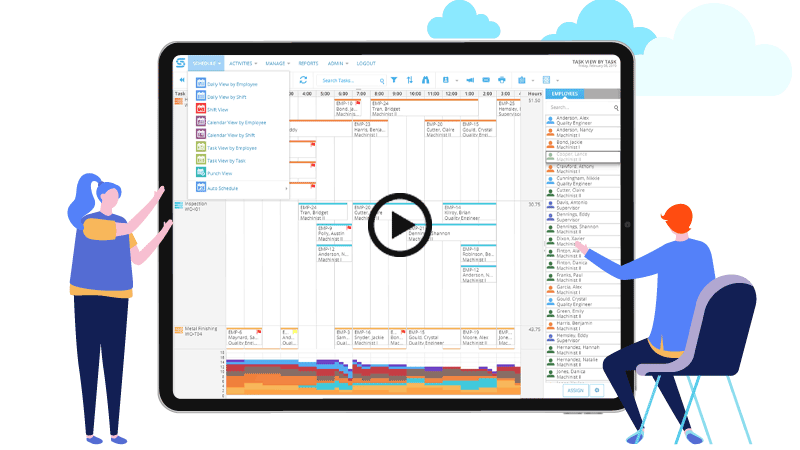
Snap Schedule Scheduling Capabilities
Snap Schedule Employee Scheduling Software helps companies meet these challenges. It is packed with powerful employee scheduling features and gives you instant access to key decision-making criteria, including staffing requirements, regular, overtime and on-call hours, labor costs, employee skills and certifications, employee availability and preferences, and more.
Easily schedule an unlimited number of factory workers
- Drag & drop to easily assign shifts, mark time off, move or copy assignments.
- View assignments and schedule your staff from three different views. Use whichever view is easiest and most effective for your shift scheduling tasks.
- Create rolling work schedules – from days to years.
- Software automatically generates work schedules using industry standard shift patterns or user-definable schedule plans.
Improve communications by empowering workers with online scheduling self-service access
Available online, 24 hours a day/7 days a week and accessible to employees whether at work or at home, Snap Schedule 365 self-service features cut scheduling and administrative time by making workers more pro-active in the process.
- View Work Schedules: View employee's shift assignments, time-off, shift trades as well as co-workers’ work schedules. From this planner, employees can filter what they want to see, request time off, bid on open shifts, and trade or pick up shifts from co-workers.
- Request Time Off: Employees can make time off/vacation requests, and schedulers can track, manage, approve, or deny those requests. Employees can see the approval status and are automatically alerted when their request is approved or rejected via an in-app notification.
- Trade/Pick Up Shifts: Allow shift trading between employees with or without a scheduler’s approval. Employees can post their assigned shifts to trade with coworkers who are eligible to work the shifts.
- Punch In/Out: Employees can punch in and out of their assigned shifts, and schedulers can see the punch data in real-time in the Punch view or run reports to see the variances between planned vs. actual work hours and costs for any date range.
- Self-scheduling with Open Shifts: Empower employees by letting them self-schedule with open shifts. Schedulers can simply create an open shift for a position and specify the number of employees needed and the required skills.
- View Time Card Information: Employees can view their planned and actual work hours for the current, previous, or next payroll cycle. On-call, overtime, paid and unpaid time-off hours are also presented.
- Look Up Coworkers: Employees can look up coworker’s contact information to call, text, or email. Schedulers decide whom to include or exclude from the directory.
- Update Availability: Save time and stay up-to-date by allowing employees to update their own contact information and availability. Employees can enter their availability information for each day of the week, and in multiple time segments as needed.
Quickly and efficiently fill a shift or find a substitute
- Quickly find and contact a substitute worker to fill a cancellation.
- Tell Snap Schedule software your criteria and it will show you a ranked list of available factory workers to fill a shift. Ranking can be based on many criteria including job position, skills, availability, labor cost, work hour limits, and seniority.
Assign breaks and tasks within each shift
- The Task Schedule Planner provides a more granular level of control for assigning factory worker activities within a shift.
- Visually assign tasks of any length from 1 minute to several hours with a simple drag and drop. You may use a task to identify a scheduled break, a work station, a munufacturing process, or a specific duty.
- Standard reports provide detailed and summary information on assigned breaks and tasks for cost control, payroll, and accounting purposes.
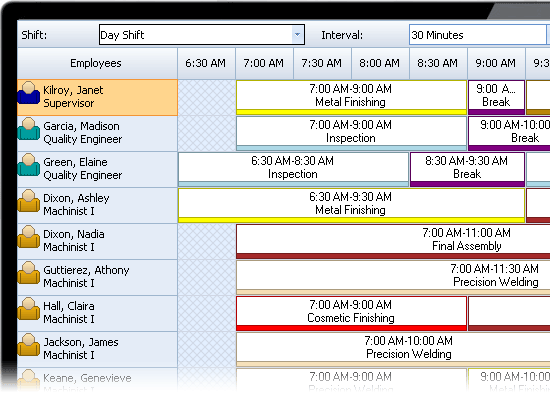
Adjust individual shift assignment start and end times
- Production workers assigned to a shift are anticipated to work the same period from the shift start time to shift end time.
- When a late start is needed or an early departure is necessary, you can adjust individual workers’ shift assignment start and end times to reflect the actual hours worked. You can also adjust the hours that the workers will be paid for working a shift.
- Labor cost reports reflect any adjustments made to the individual shift start and end times.
Multi-skill shift scheduling is a breeze
- You can identify applicable skills and certifications for any production worker. Define skills and certifications related to special training, quality assurance, health & safety, manufacturing processes, etc.
- The Shift Coverage Planner lets you know if there are enough workers with the right skills to staff a shift.
- The Staffing Overview graph displays the number of scheduled workers having a specified skill by location, shift, or hourly coverage.
Track all training, vacation, sick leave, and other off-work requests
- Define as many paid and unpaid time-off reasons as you like.
- Simply drag & drop a reason onto the Schedule Planner to mark when a production worker is off-work.
- The Schedule Outlook shows who are off-work and why.
- Available reports provide details on planned vacation, training, time off hours for any time period you select.
Work around your schedule constraints with ease
- Define your operational constraints such as non-working days, shift start times, end times and applicable days of the week for each shift.
- Define each worker’s availability, desired work hours, daily work hour constraints, and weekly work hour constraints.
- The Schedule Planner alerts you to availability conflicts, duplicate shift assignments, overlapped shift assignments, and conflicts with scheduled time off.
- The Daily Assignment Validation report identifies all discrepancies and constraint violations.
Manage labor costs and avoid over/under staffing
Snap Schedule software is an excellent fit for our industry. It helps us have fewer employees, yet get our quality, ISO-certified work done on time for our customers. Snap Schedule prints everybody's work calendars just as we like them. We can print out just the schedules for lathes, or just our mills. It's very flexible. It helps us keep our quality high and stay lean.
Thomas Kroeker
Operations Manager
Centex Machining
- Set overtime policies for your manufacturing, production, and plant maintenance operations.
- Define hourly cost, overtime exempt status and work hour constraints for each worker.
- Use the Shift Coverage planner to monitor under/over staffing conditions based on position, skill, and assignment reason.
- Adjust workers' shift assignment start time, end time, and payable hours as necessary to reflect actual work hours.
- Standard reports provide labor cost data by shift, employee, position, work order, location, and other criteria.
- Export labor cost data for payroll and accounting purposes.
Easily publish schedules to staff and management
- Print schedule views, lists, assignment calendars, and reports to communicate schedule information to management and your workers.
- Easily publish work schedules, calendars, and reports in PDF and a variety of other formats.
- Automatically email work schedules (in text or iCalendar file format) to workers and/or their supervisors.
Request a Personalized Demo & Consultation
If you prefer personalized online demo from the convenience of your office via Citrix GoToMeeting, we can do that too. We will schedule one of our product specialists to help you set up your schedule, walk you through the many features of our scheduling software, and answer your specific questions. There is no risk, no cost, and absolutely no obligation on your part.
Request a DemoTry It For Yourself
Try Snap Schedule 365 absolutely free for a full 30 days. The trial period starts on the day you first use our software and automatically expires 30 days after. You can use one of the sample schedules to evaluate the software features or enter real data and use Snap Schedule 365 to schedule and manage your employees.
Get Your Free TrialQUESTIONS? OUR REPS HAVE ANSWERS. 1-800-450-4230
We are proud to serve some of the world's biggest brands